If you have a work Outlook calendar and a personal Google Calendar, you have probably been double-booked at least once. The honest reality is this: Microsoft and Google do not offer a native, free, two-way calendar sync between Outlook and Google Calendar. They offer one-way subscription via ICS URLs, which is free and slow. Two-way real-time sync requires a third-party tool, paid or free.
This guide walks through the one-way ICS method in both directions, covers the two-way sync options (OGCS for free, CalendarBridge for reliable) and flags the personal-versus-work account caveats that trip people up. Set this up once and stop the double-booking.
Pick the right method for your situation
| Your situation | Best method |
|---|---|
| Just want to see Outlook events inside Google Calendar (or vice versa) | One-way ICS subscription (free). 4-24 hour refresh delay. |
| Need real-time two-way sync for an actively used pair of calendars | CalendarBridge or similar service ($4-8/month). |
| Power user comfortable with a Windows desktop app | OGCS (Outlook Google Calendar Sync) free open source app. |
| Personal Outlook.com plus personal Google account | Connect Google directly inside Outlook.com Settings. |
| Both accounts open on the same Android or iOS phone | Add both accounts to the phone's Calendar app. Easiest mobile-first path. |
Method 1: Show Outlook calendar inside Google Calendar (one-way, free)
This is the most common ask. You live mostly in Google Calendar but want your Outlook events visible so you do not schedule conflicts.
Step 1: Get the Outlook ICS URL
- Open Outlook on the web and sign in.
- Click the gear icon in the top right, then View all Outlook settings at the bottom.
- Go to Calendar > Shared calendars.
- Scroll to Publish a calendar.
- Pick the calendar you want to share from the dropdown.
- Set permissions to Can view all details (lower levels block Google from reading event content).
- Click Publish.
- Copy the ICS link (the longer URL ending in .ics). Do not copy the HTML link.
Step 2: Add the ICS URL to Google Calendar
- Open Google Calendar in a browser at calendar.google.com.
- In the left sidebar, find Other calendars.
- Click the + icon next to it.
- Pick From URL.
- Paste the ICS URL you copied from Outlook.
- Click Add calendar.
Your Outlook events now appear in Google Calendar under Other calendars. Rename it and change the colour by hovering over the calendar entry and clicking the three-dot menu.
Method 2: Show Google Calendar inside Outlook (one-way, free)
The mirror version. You live mostly in Outlook but want Google events visible.
Step 1: Get the Google Calendar ICS URL
- Open Google Calendar.
- In the left sidebar, hover over My calendars, find the calendar you want to share.
- Click the three-dot menu, pick Settings and sharing.
- Scroll to Integrate calendar.
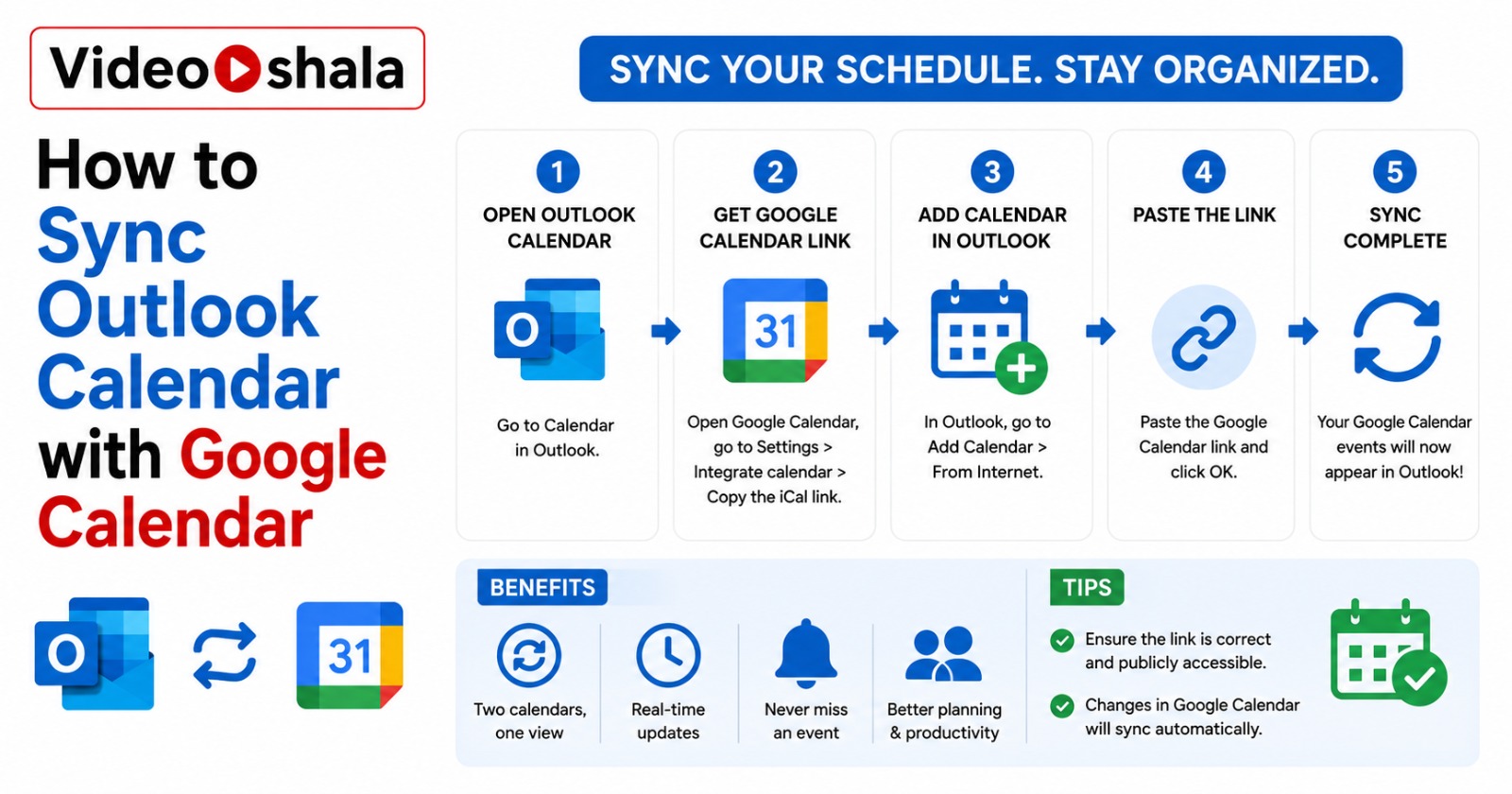
- Copy the Secret address in iCal format. NOT the Public address (which only works if the calendar is set to public).
Step 2: Add the URL to Outlook
New Outlook or Outlook on the web:
- In the Calendar view, click Add calendar below the mini calendar.
- Pick Subscribe from web.
- Paste the iCal URL.
- Give it a name and pick a colour.
- Click Import.
Classic Outlook for Windows:
- Switch to Calendar view.
- Right-click Other Calendars in the sidebar.
- Pick Add Calendar > From Internet.
- Paste the iCal URL and click OK.
The refresh delay (and why "sync" is the wrong word for ICS)
Both methods above are called sync by most guides, but they are really one-way subscriptions. The receiving calendar polls the source ICS URL on its own schedule.
| Source | Typical refresh delay |
|---|---|
| Outlook → Google Calendar | 4-24 hours, sometimes longer |
| Google Calendar → Outlook | 3-24 hours |
| Either direction with deletion | Sometimes never reflects until you remove and re-add the subscription |
You cannot force a refresh on either side. This means: if you cancel a meeting in Outlook, your Google Calendar may still show it as scheduled for the rest of the day. If you reschedule an event in Google, your Outlook may show both the old and new times for hours.
For viewing weekly meetings that rarely change, this is fine. For an active sales-style calendar with frequent reschedules, this will frustrate you. Move to Method 3.
Method 3: Two-way sync with OGCS (free, Windows desktop)
Outlook Google Calendar Sync (OGCS) is a free open-source Windows desktop app that connects to your Outlook profile (classic or new Outlook with M365 cloud) and a Google account. It pushes changes in either direction within minutes.
Setup overview
- Download OGCS from the official site. Install on the Windows PC that runs your Outlook.
- Launch OGCS. Sign in to Google when prompted. Grant calendar access.
- Pick the Outlook calendar to sync from the dropdown.
- Pick the Google Calendar to sync into.
- Set the sync direction: Outlook to Google, Google to Outlook or two-way.
- Set the time range (default is 1 month back, 12 months forward).
- Click Sync now to run the first pass. After that, OGCS can run automatically every 10 minutes while open.
The catch: OGCS only syncs while the PC is awake and the app is running. For desktop users who leave the PC on, that is fine. For laptop users who close the lid, sync pauses when the laptop sleeps. For full set-and-forget sync, you need a cloud-based service.
Method 4: Two-way sync with a paid cloud service
Cloud sync services like CalendarBridge, Sync2 Cloud and Zapier connect to both calendars and run sync on their own infrastructure, independent of your devices.
| Service | Approximate cost |
|---|---|
| CalendarBridge | $4-8/month, dedicated calendar sync |
| Zapier | Free tier with limits, $20+/month for unlimited triggers |
| Sync2 Cloud | $25/year approx, Windows-leaning |
CalendarBridge is the most commonly recommended because it is purpose-built for calendar sync, handles cancellations and updates reliably and lets you choose whether to show full event details or just "busy" blocks. Zapier works but needs careful trigger setup and can miss updates if you exceed the free tier.
Method 5: Personal Outlook.com plus personal Google (the easy case)
If both your Outlook and Google accounts are personal (Outlook.com, Hotmail.com, plus a free Gmail), there is a direct connector inside Outlook.com that pulls Google Calendar events without an ICS URL.
- Sign in to outlook.live.com (personal account only).
- Go to Settings > Mail > Sync email > Connected accounts (or similar in current UI).
- Click Other email accounts, sign in with your Google credentials, grant permission.
- Calendar events from the connected Google account appear in your Outlook.com Calendar.
This option does NOT exist for work or school M365 accounts. Microsoft removed it for security reasons years ago. Work accounts must use one of the methods above.
Common problems and quick fixes
| Problem | Fix |
|---|---|
| Outlook calendar not showing in Google after 24 hours | You probably copied the HTML link, not the ICS link. Remove the subscription, get the ICS link (longer URL ending in .ics) and re-add. |
| Google events appear but with no details | Calendar permission is set to busy/free only. Change to "Can view all details" in the source calendar's sharing settings. |
| Cancelled meeting still showing | ICS does not always propagate deletions. Remove and re-add the subscription to force a fresh pull. |
| OGCS keeps creating duplicates | Sync direction probably set to two-way with overlap detection off. In OGCS settings, tick "Detect duplicates" and run a clean sync. |
| Work admin blocks the Publish calendar option | Corporate security policy. Speak to IT admin or use Calendar Interop (admin-level Workspace + M365 integration). |
What I would actually do
If you just want visibility (see your Outlook meetings in Google Calendar so you do not double-book), use Method 1. Free, takes 5 minutes to set up, refresh delay is acceptable for viewing.
If you actively use both calendars (create events in either and need them to sync), pay for CalendarBridge. $5/month is cheap insurance against missing meetings and the time saved on the first month of conflict-management pays it back.
If you live on Android, add both accounts to your phone's Calendar app. Both calendars show in a single unified view and there is no sync needed on the phone side itself.
For a related Outlook tip, see our guide on fixing Outlook search not working. For the Gmail side of email scheduling, our guide on scheduling emails in Gmail covers the equivalent timing controls.